Design of Gitea Actions
Gitea Actions has multiple components. This document describes them individually.
Gitea Runner
Gitea Runner is based on a hard fork of nektos/act.
Like other CI runners, we designed it as an external part of Gitea, which means it should run on a different server than Gitea.
To ensure that the runner connects to the correct Gitea instance, we need to register it with a token. Additionally, the runner will introduce itself to Gitea and declare what kind of jobs it can run by reporting its labels.
Earlier, we mentioned that runs-on: ubuntu-latest in a workflow file means that the job will be run on a runner with the ubuntu-latest label.
But how does the runner know to run ubuntu-latest? The answer lies in mapping the label to an environment.
That's why when you add custom labels during registration, you will need to input some complex content like my_custom_label:docker://centos:7.
This means that the runner can take the job which needs to run on my_custom_label, and it will run it via a docker container with the image centos:7.
Docker isn't the only option, though.
The runner also supports running jobs directly on the host.
This is achieved through labels like linux_arm:host.
This label indicates that the runner can take a job that needs to run on linux_arm and run it directly on the host.
The label's design follows the format label[:schema[:args]].
If the schema is omitted, it defaults to host.
So,
my_custom_label:docker://node:18: Run jobs labeled withmy_custom_labelusing thenode:18Docker image.my_custom_label:host: Run jobs labeled withmy_custom_labeldirectly on the host.my_custom_label: Same asmy_custom_label:host.my_custom_label:vm:ubuntu-latest: (Example only, not implemented) Run jobs labeled withmy_custom_labelusing a virtual machine with theubuntu-latestISO.
Communication protocol
As the runner is an independent part of Gitea, we needed a protocol for runners to communicate with the Gitea instance. However, we did not think it was a good idea to have Gitea listen on a new port. Instead, we wanted to reuse the HTTP port, which means we needed a protocol that is compatible with HTTP. We chose to use gRPC over HTTP.
We use actions-proto-def and actions-proto-go to wire them up. More information about gRPC can be found on its website.
Network architecture
Let's examine the overall network architecture. This will help you troubleshoot some problems and explain why it's a bad idea to register a runner with a loopback address of the Gitea instance.
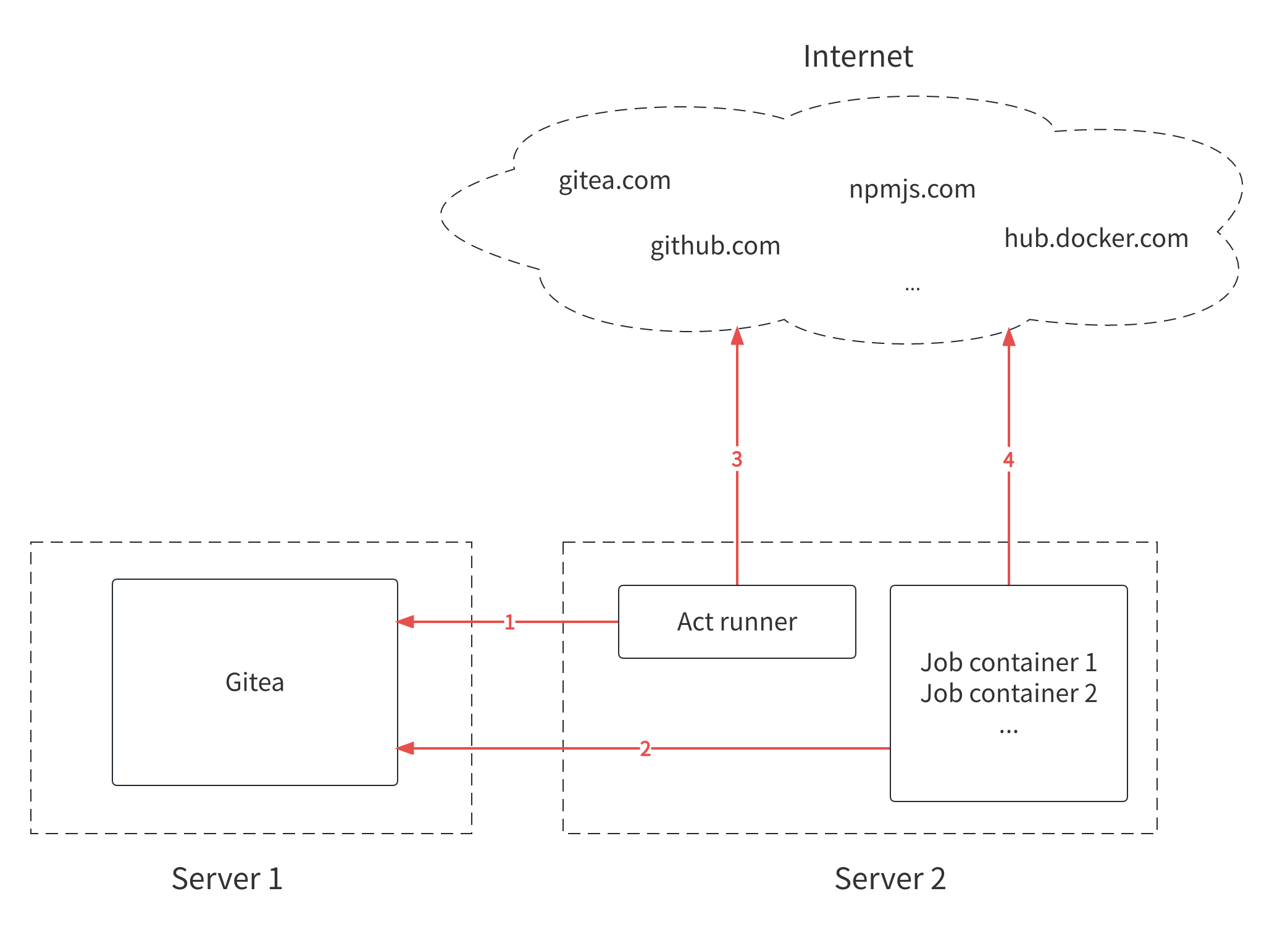
There are four network connections marked in the picture, and the direction of the arrows indicates the direction of establishing the connections.
Connection 1, runner to Gitea instance
The runner must be able to connect to Gitea to receive tasks and send back the execution results.
Connection 2, job containers to Gitea instance
The job containers have different network namespaces than the runner, even if they are on the same machine.
They need to connect to Gitea to fetch codes if there is actions/checkout@v4 in the workflow, for example.
Fetching code is not always necessary to run some jobs, but it is required in most cases.
If you use a loopback address to register a runner, the runner can connect to Gitea when it is on the same machine. However, if a job container tries to fetch code from localhost, it will fail because Gitea is not in the same container.
Connection 3, runner to internet
When you use some actions like actions/checkout@v4, the runner downloads the scripts, not the job containers.
By default, it downloads from github.com, so it requires access to the internet. If you configure the DEFAULT_ACTIONS_URL to self, then it will download from your Gitea instance by default. Then it will not connect to internet when downloading the action itself.
It also downloads some docker images from Docker Hub by default, which also requires internet access.
However, internet access is not strictly necessary. You can configure your Gitea instance to fetch actions or images from your intranet facilities.
In fact, your Gitea instance can serve as both the actions marketplace and the image registry. You can mirror actions repositories from GitHub to your Gitea instance, and use them as normal. And Gitea Container Registry can be used as a Docker image registry.
Connection 4, job containers to internet
When using actions such as actions/setup-go@v5, it may be necessary to download resources from the internet to set up the Go language environment in job containers.
Therefore, access to the internet is required for the successful completion of these actions.
However, it is optional as well. You can use your own custom actions to avoid relying on internet access, or you can use your packaged Docker image to run jobs with all dependencies installed.
Summary
Using Gitea Actions only requires ensuring that the runner can connect to the Gitea instance. Internet access is optional, but not having it will require some additional work. In other words: The runner works best when it can query the internet itself, but you don't need to expose it to the internet (in either direction).
If you encounter any network issues while using Gitea Actions, hopefully the image above can help you troubleshoot them.